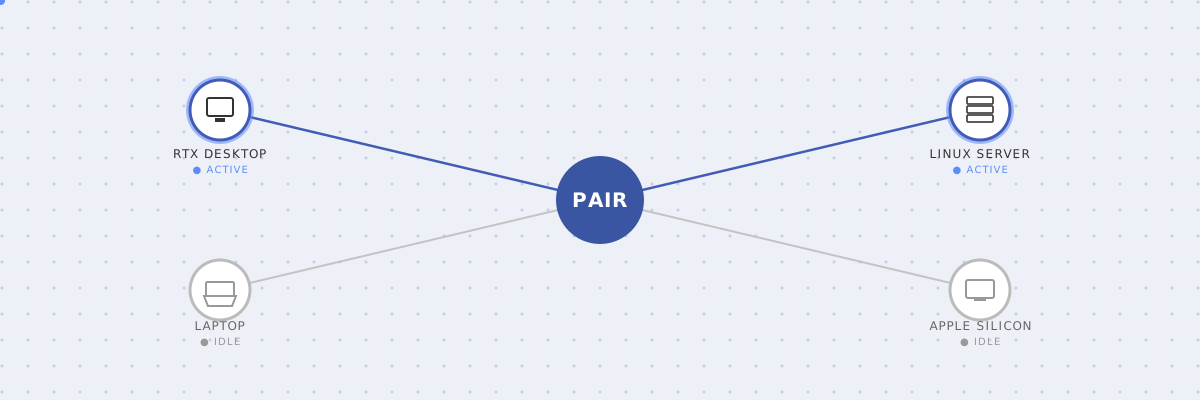
Local AI has reached an awkward inflection point. If you run models on your own hardware, you probably own more than one capable machine: a primary gaming desktop with a beefy RTX card, a laptop or Mac sitting on a dock, perhaps an older workstation or home lab server idling under a desk. Yet the moment you spin up multi-step agentic workflows, background RAG pipelines, or coding assistants, your primary machine chokes while the rest of your local hardware sits unused.
Enter NVIDIA PAIR (Personal AI Router). Open-sourced under the Apache 2.0 license in September 2026, PAIR solves the fragmented-compute problem by turning the machines already on your LAN into a coordinated local inference pool.
A Router, Not a Supercomputer
To understand why PAIR is compelling, it helps to understand what it isn’t. It doesn’t shard a single 70B-parameter model across three machines over Wi-Fi, and it doesn’t pool VRAM. Model-parallel tensor sharding over consumer Ethernet introduces latency bottlenecks that make it impractical on a home network.
Instead, PAIR acts as a router for inference requests. When an agent, script, or IDE plugin issues an OpenAI-compatible API request, PAIR checks which paired machines are actually available right now and hands the complete prompt to one of them — never split across several.
- Heterogeneous by design: PAIR runs on Windows, Linux, and macOS, in both x64 and arm64 builds — your RTX rig, a Linux home server, and an Apple Silicon laptop can all sit in the same pool.
- Built on engines you already run: At launch it drives two inference backends — Ollama and LM Studio — rather than inventing a new model format.
- Load-aware: PAIR keeps track of how busy each paired machine is and steps back from a node that’s already loaded with something else, favoring whichever machine actually has headroom.
How PAIR Actually Works
Under the hood, PAIR runs as a local daemon that exposes an OpenAI-compatible endpoint — and an Ollama-compatible one — to any application on your primary machine. It keeps track of which paired nodes are online and what they can currently serve, and dispatches each incoming request to one of them. The routing logic, not tensor math, is the whole product.
Why It Matters for Local AI Agents
The shift from single-prompt chatbots to autonomous agents breaks single-GPU local setups. A modern agentic loop doesn’t just generate one response; it calls tools, validates syntax, summarizes documents, and reflects on intermediate steps — often requiring dozens of LLM calls in under a minute.
Firing off fifteen serial calls against a single local GPU grinds your system to a halt. With PAIR, your IDE can query a coding model on your desktop’s RTX GPU while a background research task runs against an Ollama instance on your secondary rig — concurrent agent execution, zero cloud API fees, and your data never leaving hardware you own.
PAIR shows a pragmatic understanding of how enthusiasts and developers actually work: instead of telling you to buy an enterprise cluster, it turns the silicon you already paid for into a distributed home data center.
Getting It Running: Native Installers, Not Containers
PAIR ships today as a public beta (v0.1.1) under Apache 2.0, as a signed native desktop app — there’s no official container image to pull and no docker-compose file to write.
- Install PAIR on your primary machine. Grab the signed installer for your OS — Windows, macOS, or Linux, x64 and arm64 are both supported — from the NVIDIA/Personal-AI-Router releases page and run it like any other desktop app.
- Run your inference engine on each node. PAIR currently drives two backends: Ollama and LM Studio. Install and run whichever one you already use on each machine you want in the pool. Whether a given model actually runs well on a given machine is between that engine and that hardware — PAIR doesn’t second-guess it.
- Pair the nodes. From your primary machine, invite a second one to join. The inviting machine displays a six-digit PIN, you enter it on the invited machine, and that PIN is the entire trust bootstrap — no certificates, no manual key exchange.
- Point your applications at PAIR. PAIR exposes its OpenAI- and Ollama-compatible endpoints locally; the exact URL and port are shown in the app itself under Endpoints → API endpoints. Swap that into whatever you’d normally point at
http://localhost:11434— your IDE, an agent framework, Open WebUI — and PAIR takes it from there.
Once it’s running, PAIR opportunistically balances agentic workloads across your local fleet instead of pinning everything to whichever machine happens to be in front of you.